Suggestion 1: Review cache performance information (product and item)
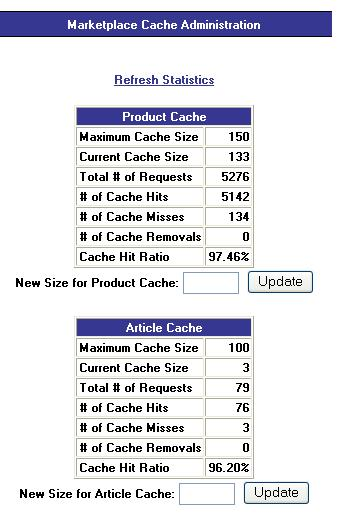
Cache performance information can be found by logging into the Marketplace Operations Center as a user with either the Chief Administrator or Mall Administrator role. The link to view cache statistics should be on the initial operations center page (home.jsp). If the cache sizes are set too low, performance can be affected due to churn.
The goal is to have cache hit ratios as high as possible (90+ percent).
A DBA with access to the Marketplace database can run the following query on the abs_item table. This will bring back the row count:
select count(*) from abs_item
Then, compare the row count to the current product cache setting. A general rule would be to set the cache size to the current number of defined products or a bit higher, provided that there is ample physical memory available. The current cache size is just a number indicating how many products or items are currently being held in the cache. For more information on the cache, see the Marketplace User's Guide for your Marketplace version.
Example of Good Cache Settings
Suggestion 2: Look at the webLogging property
The webLogging property is set in the web.prp configuration file (located in both admin and buyer directories).
This property should be set to false to keep Marketplace from generating unnecessary log file information.
web.LoggingEnabled=false